





Fubo is one of the biggest streaming providers available in the market. As a replacement to cable or satellite offerings, it carries hundreds of channels that mostly center around sports. Fubo describes itself as the world’s only sports-focused live TV streaming service. Therefore, it is no surprise that Fubo has multiple tips and tricks that allow subscribers to get the full viewing experience.
Some of the things that Fubo has in its arsenal allow fans to watch multiple games at one time. Also, Fubo actively promotes its recording features that allow fans to watch one game at a time. For soccer fans, this can be very useful. Fubo has coverage of different leagues and competitions on different channels.
Here are some of the best parts of the service that people can take advantage of when they subscribe to Fubo.
Fubo offers several tips and tricks for users
Selecting your most-watched channels
When signing up for Fubo, the streaming provider allows you to select your most-watched channels, shows, or sports teams. The great thing about selecting your favorite channels is that you know exactly where you will find them. Recently, Fubo redesigned its user interface, and it put the ‘Fubo Spotlight’ at the top. That focuses on the biggest TV shows, sports, or movies that people may be interested in. It is both live and on-demand content.

However, just beneath it, there is a ‘Live TV for You’ category. This highlights the live broadcasts showing your favorite sports teams and favorite channels. It is straightforward to navigate. Also, if you go to the ‘Guide’ section, your favorite channels will gravitate toward the top. This is similar to what YouTube TV does by allowing users to organize their guide. However, this is built into the Fubo software.
If you missed the chance to add your favorite channels, do not fret. You can add channels to your favorites at any time. If you are watching on your computer or laptop, start watching the channel you want to favorite. In the top left of the screen, you will see a star. When you click the star, it will say that you added the channel to your favorites.
Fubo allows different profiles, just like other streaming providers. Different profiles can pick their favorite channels and teams which allows Fubo to make personalized suggestions.
Multiview and Miniplayer
If you do have multiple games happening at once on your favorite channels, Fubo can show four games at once on one screen. Fubo Multiview allows subscribers to pick up to four games simultaneously in four quadrants of the screen. It is similar to the Multicast feature on ESPN+ that allows users to do the same.
Unfortunately, this is only available on Apple TV devices. If you are watching on your PC or smartphone, you are limited to one game at a time. But, if you do have an Apple TV, Multiview is useful during those busy matchdays.
Even if you do not have an Apple TV device, one thing anyone can use is the Miniplayer tool. As you scroll through the offerings on Fubo, you can have live TV on a small portion of your screen. When you hover over a channel, game, or other program, you can click the three dots (…). That shows the option to play the content in a small screen. The little pop-up window will disappear when you open a different game or program. However, if you are undecisive with all of Fubo’s content, you do not have to miss any action while making a decision.
Our Pick:Includes: Premier League, Liga MX, Ligue 1, + 84 Sports Channels |
 |
Large DVR
Fubo is also known for its ability to use recordings. Base accounts have 30 hours of recording available at no additional charge. However, this is not 30 hours per profile. You can create different profiles on one Fubo account to keep different users’ content separate. However, the 30 hours apply to the account as a whole.
You do not have to sift through the guide or the upcoming programs to record them. Instead, you can schedule recordings based on your preferences. In the guide, you can click the dot with a circle around it that represents the record sign. That will record the entire program.
When you do pick a favorite team, Fubo will automatically record each of its games. You can turn off this setting in the ‘My Stuff’ tab on the Fubo home screen. The same applies to different shows. When you see a show in the Fubo selection screen, you can hover over the three dots. There will be four options that drop down, and one of those is to record the entire series of a show.
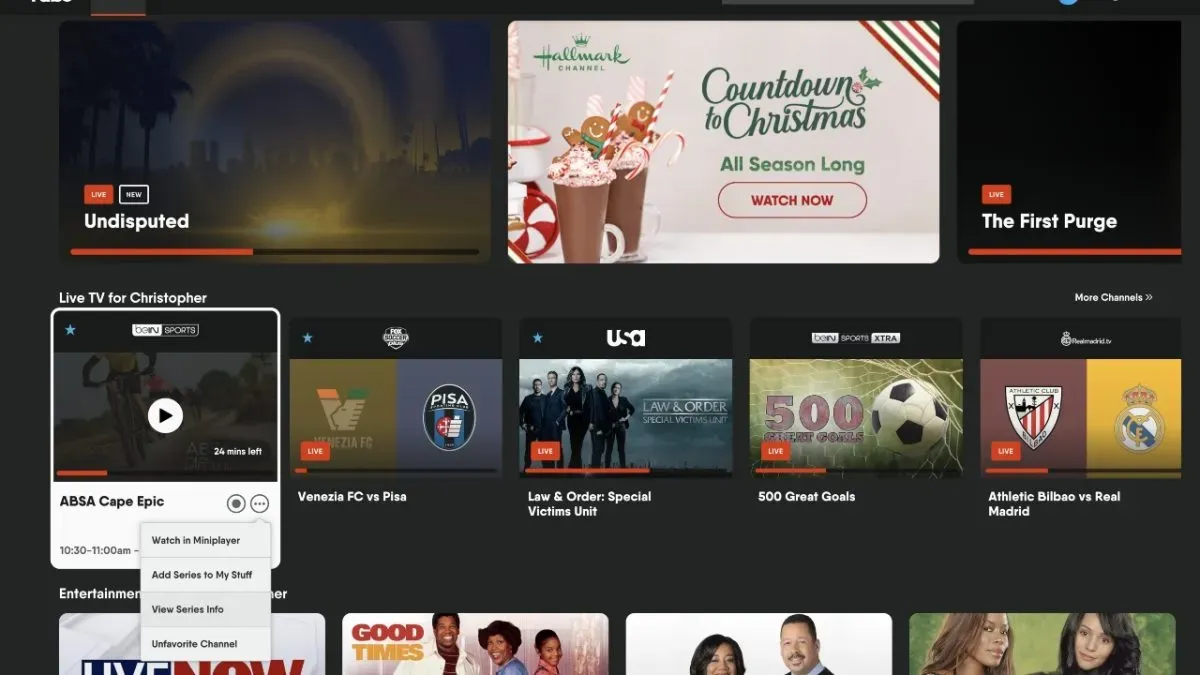
As seen, the three dots underneath a TV show allow you to “Add Series to My Stuff.” This will record the show every time it comes on.
Still, you can record a game that you may miss because you are not at your TV, or you are focusing on a different game. Then, it is easy to locate the recorded game in the Fubo user interface.
It falls under the revamped ‘My Stuff’ section on the Fubo screen. You will find all your recordings organized by your preferences in one section. At the end of watching, or even before then if you need to clear space, you can delete the recording.
Refer a friend to earn money
Referrals are common in different parts of the consumer world. Fubo is no different. Found under your “Account” settings in the Fubo app, the referral section provides more details. Users can earn up to $30 when they provide a link to a friend who uses that to sign up.
The person subscribing with that referral will also receive up to $30.
PHOTO: IMAGO and Levine-Roberts